Prompting for a Pending Professional Services Invoice
This topic is intended for Independent pharmacies only and is not applicable to Rexall pharmacies.
When a patient has an outstanding Professional Services Invoice, the following prompt appears upon opening the Patient Folder.
If the patient is eligible for more than one type of prompt, they will display in the order specified in More (...) > List Maint > System Tray Prompting.
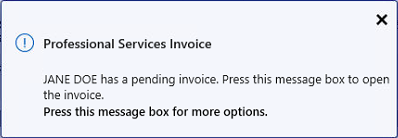
A Professional Services Invoice is deemed as pending if charges were selected in the Professional Services window, but an invoice was not printed (i.e., OK was selected instead of Print). For more information, see Generating the Professional Services Invoice.
To stop the prompt from reappearing:
-
Open the Patient Folder.
-
Select the Profile tab.
-
Do one of the following:
-
Select the prompt.
-
Select a prescription on the Profile and then select Rx > PFS > Prof Services.
-
-
Select Print. Once printed, the Professional Service(s) is deemed completed, and the prompt will no longer appear for that patient until another Professional Service is opened.